
Student Admin - Student User Accounts - Advanced Access
1.
<span>[Knowledge Base](index.html)</span>
</div>
# <span id="title-text"> Knowledge Base : Student Admin - Student User Accounts - Advanced Access </span>
</div>
<div id="content" class="view">
<div class="page-metadata">
Created by <span class="author"> user-b1fcb</span>, last modified by <span class="editor"> Erik Graham</span> on Mar 10, 2022
</div>
<div id="main-content" class="wiki-content group">
**Placing Agency Related Guide (PARG)****
Summary:**
Student Access to HSPnet is mostly read-only and does not permit the students to edit information entered on their profile. It is possible to grant Advanced Student Access in order to permit students to upload documents for review by the Placing Coordinator for release to Sites. This guide explains the steps for enabling Advanced Student Access.##
Requirements

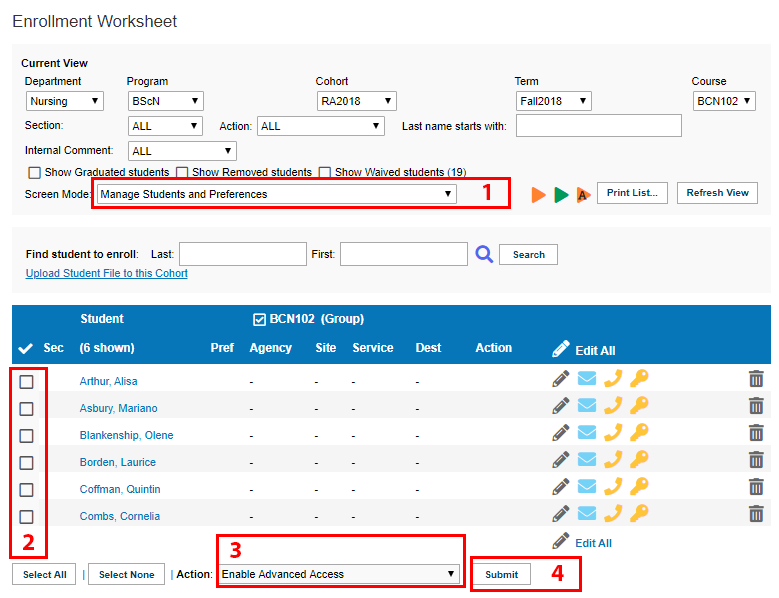
1. Enable Advanced Student Access via the Enrollment screen:

 icon.
Ensure that the Screen Mode is set to Manage Students and Preferences (1) Mark the checkbox for one or more student whose access is to be enabled (2). From the Action drop down menu, select Enable Advanced Access (3), then click Submit (4).
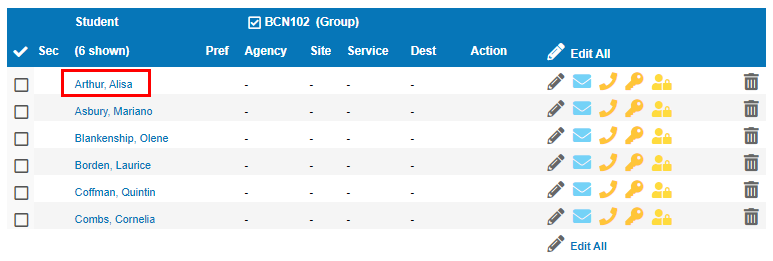
If students already have active access to HSPnet, and you enable advanced access, these students will also receive an e-mail and a new temporary password.


 icon also indicates that Advanced Access has been granted successfully.


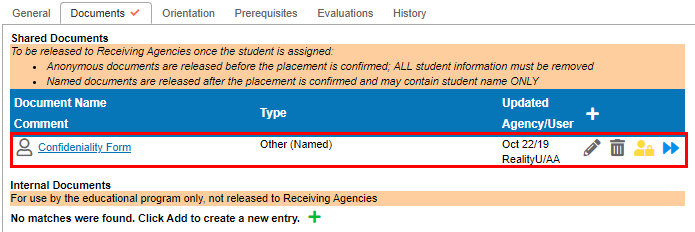
2. Monitor Student Documents (Student Profile):


 icon to allow other HSPnet users with access to the student profile the ability to access the document.
If a student has uploaded an Internal Document, a notification will be generated for review, but the document will not be released to the Site, and will only be made available internally.
When a student has uploaded a document that needs to be reviewed, this is marked by the Yellow Paperclip

 icon. When a document has been uploaded to the student profile, this will be indicated by the Grey Paperclip

 icon.

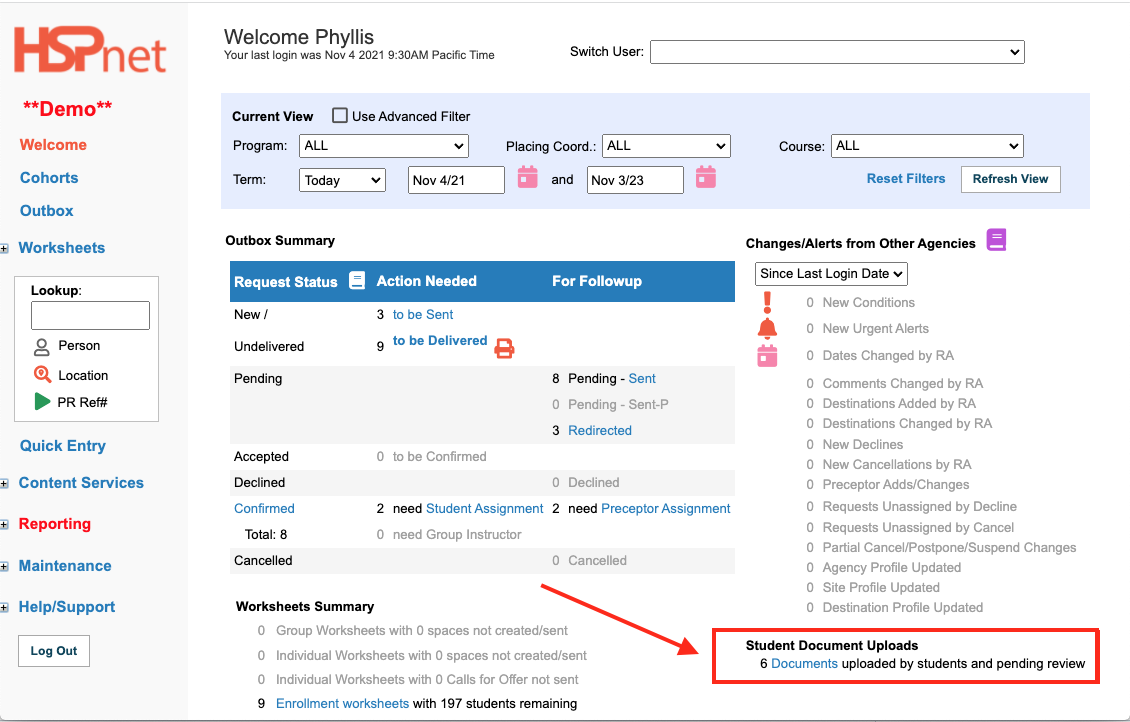
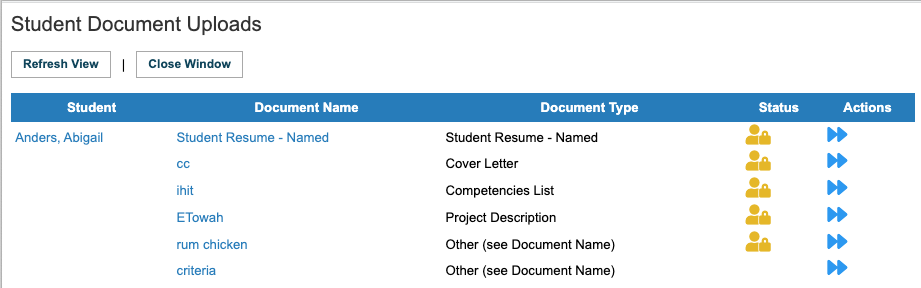
Whenever a student has been granted Advanced Access and uploads a document to their profile, you will also be notified via your Welcome screen.
Click the link to view the documents and you can approve/release them from here.


<div class="pageSection group">
<div class="pageSectionHeader">
## Attachments:
</div>
<div class="greybox" align="left">

[image2018-11-19_9-43-43.png](attachments/7569499/7569488.png) (image/png)

[image2018-11-19_9-47-47.png](attachments/7569499/7569489.png) (image/png)

[image2018-11-19_9-49-12.png](attachments/7569499/7569490.png) (image/png)

[image2018-11-19_9-49-47.png](attachments/7569499/7569491.png) (image/png)

[image2018-11-19_9-50-6.png](attachments/7569499/7569492.png) (image/png)

[image2018-11-19_9-51-41.png](attachments/7569499/7569493.png) (image/png)

[image2018-11-19_9-53-13.png](attachments/7569499/7569494.png) (image/png)

[image2018-11-19_9-53-30.png](attachments/7569499/7569495.png) (image/png)

[image2018-11-19_9-54-42.png](attachments/7569499/7569496.png) (image/png)

[image2018-11-19_9-54-51.png](attachments/7569499/7569497.png) (image/png)

[image2018-11-19_9-55-8.png](attachments/7569499/7569498.png) (image/png)

[school email.PNG](attachments/7569499/25724033.png) (image/png)

[goto enrollment.PNG](attachments/7569499/25724034.png) (image/png)

[sl1b.png](attachments/7569499/25724035.png) (image/png)

[advanced access.PNG](attachments/7569499/25724036.png) (image/png)

[sl2.PNG](attachments/7569499/25724037.png) (image/png)

[sl3b.png](attachments/7569499/25724038.png) (image/png)

[release document.PNG](attachments/7569499/25724039.png) (image/png)

[sl4b.png](attachments/7569499/25724040.png) (image/png)

[paper clip - yellow.PNG](attachments/7569499/25724041.png) (image/png)

[paper clip - grey.PNG](attachments/7569499/25724042.png) (image/png)

[sl5.PNG](attachments/7569499/25724043.png) (image/png)

[Screen Shot 2021-11-04 at 14.46.27.png](attachments/7569499/51315209.png) (image/png)

[Screen Shot 2021-11-04 at 14.50.50.png](attachments/7569499/51315211.png) (image/png)

[Screen Shot 2021-11-04 at 14.53.06.png](attachments/7569499/51315213.png) (image/png)
</div>
</div>
</div> </div>
<div id="footer" role="contentinfo">
<section class="footer-body">
Document generated by Confluence on Nov 03, 2023 15:06
<div id="footer-logo">[Atlassian](https://www.atlassian.com/)</div>
</section>
</div>
</div>