
Multi-Factor Authentication in HSPnet
Multi‑Factor Authentication (MFA) is a user access security method that requires more than one method of proof (factors) to verify user identity before enabling access to an application.
In HSPnet, this requirement consists of an authentication code sent by email. Each login requires users to enter their user ID and password, along with this authentication code. Users also have the option of selecting “Trust this Device”, to be able to log in on the same device without entering an authentication code for each session for a maximum of 30 days.
When users select the “Trust this Device” option, their browser and its environment will be remembered as trusted, and they will not need an authorization code again. Access from a different browser or device will require a separate authentication code to log in.
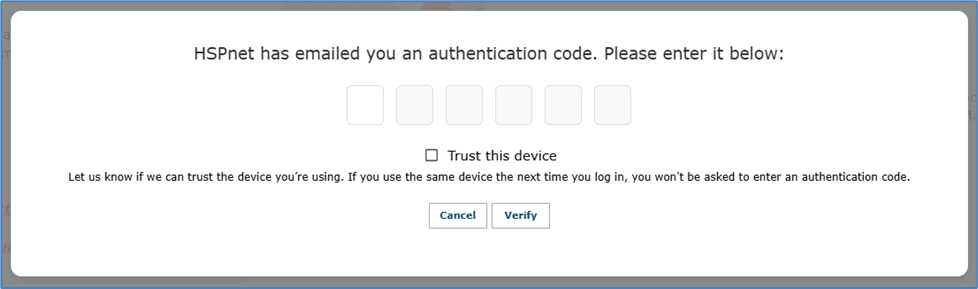
MFA authentication code request at login
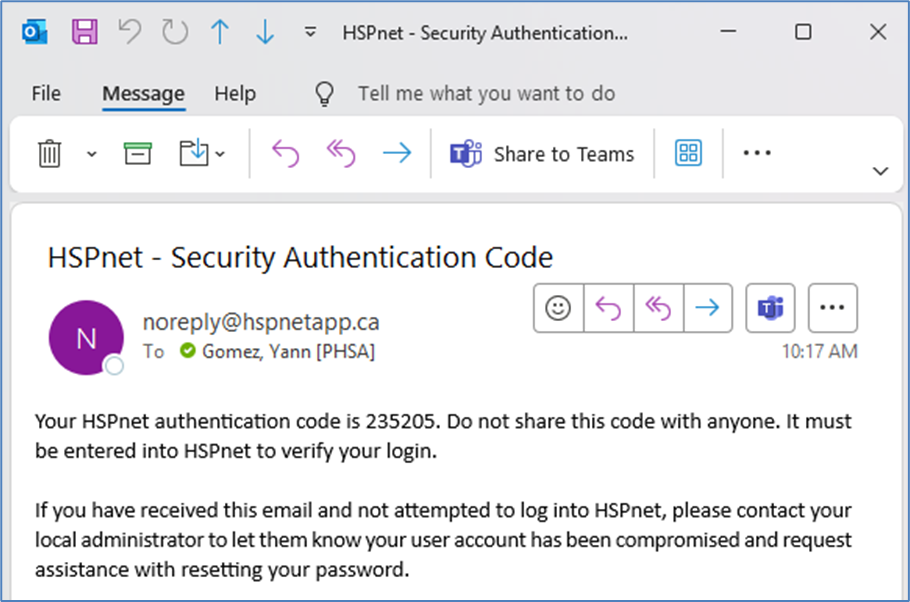
Authentication code email
Please remember:
• HSPnet user accounts are authorized and maintained by their Agency
• Each agency is expected to manage their users, including assignment of role and user ID/password resets and activations
• Each agency is responsible for ensuring all users have a valid and trusted email address
• If a user has a shared email address as their primary, they are required to provide a secure named second email (not shared) to receive the authentication code. Contact the helpdesk to activate a 2nd email.
In each HSPnet agency, local administrator users can update user accounts and associated passwords. If users are unable to receive the authentication code by email, they will not be able to log into HSPnet. User email addresses may be reviewed and updated as necessary in the Staff/Users Maintenance screen.
Please refer to the Create (or Edit) a New Staff Record and Shared Email Addresses guides in the Knowledge Base for assistance with this.
User considerations:
A user will always be required to provide their username and password. The current process for “forgot password” remains without change
Users will have the option of selecting “Trust This Device”, and when they choose this option, a cookie will be set on their device and information about their browser environment will be saved
Should a user NOT choose to “Trust This Device”, information about their browser environment will not be saved, and a cookie will not be set. They will be asked to verify their identity with an authentication code on subsequent logins
- If their browser is set for private browsing, information will still be collected and saved when they select “Trust This Device”, but the cookie will not be retained to trust their device
On a subsequent login, if the user mistypes their password, or if their browser environment has changed, their device will not be trusted, and another authentication code will be emailed to let them reverify
- If a password manager is used, it must be updated when a new password is set in HSPnet, as it may otherwise pre-fill a previous password, which will not be valid and thus revoke the trusted status
A user may have more than one trusted device. Each time they authenticate with HSPnet on a new device, they will be required to verify with the authorization code. Once trusted, each device will be remembered, and they will not be asked to repeat the authorization code
- A device will be remembered for up to 30 days. If changes to the device (or its environment) are detected before this 30-day period, the user will be asked to reverify with an authorization code