
Placement Requests - (RA) - Clone Feature for RCs
1.
<span>[Knowledge Base](index.html)</span>
</div>
# <span id="title-text"> Knowledge Base : Placement Requests - (RA) - Clone Feature for RCs </span>
</div>
<div id="content" class="view">
<div class="page-metadata">
Created by <span class="author"> user-b1fcb</span>, last modified by <span class="editor"> Erik Graham</span> on Aug 09, 2021
</div>
<div id="main-content" class="wiki-content group">
**Receiving Agency Related Guide (RARG)****
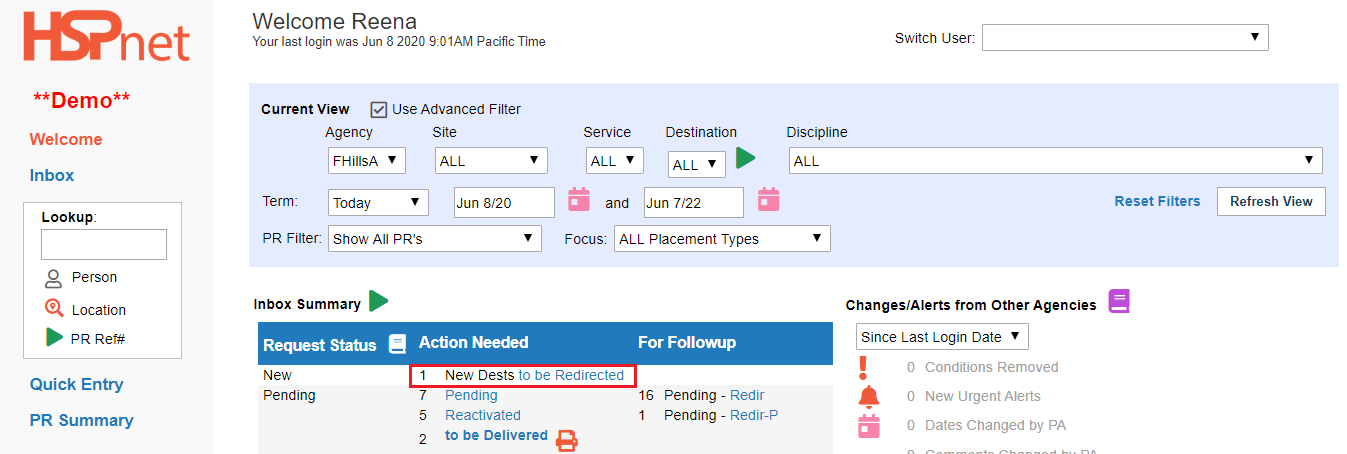
Summary:**<span> </span> The Clone feature allows a Receiving Coordinator to duplicate an individual placement request. The duplicate can be edited to another site, service or destination at the user's agency and processed like any other request.
This feature is available to the RC role only, and only if help desk has enabled the feature for the user.
Rules:
The Clone feature only works with individual placements, and with Quick Entry requests (it cannot work with placement requests created from Cohort group worksheets).
The Clone Feature only works with requests in the following statuses:-
In Summary: it will not work if the request status is AccA or Confirmed.
Set up your personal RC account:
- You need to request HSPnet support to turn the feature on for your personal HSPnet user account (one time only).
To use the clone feature:
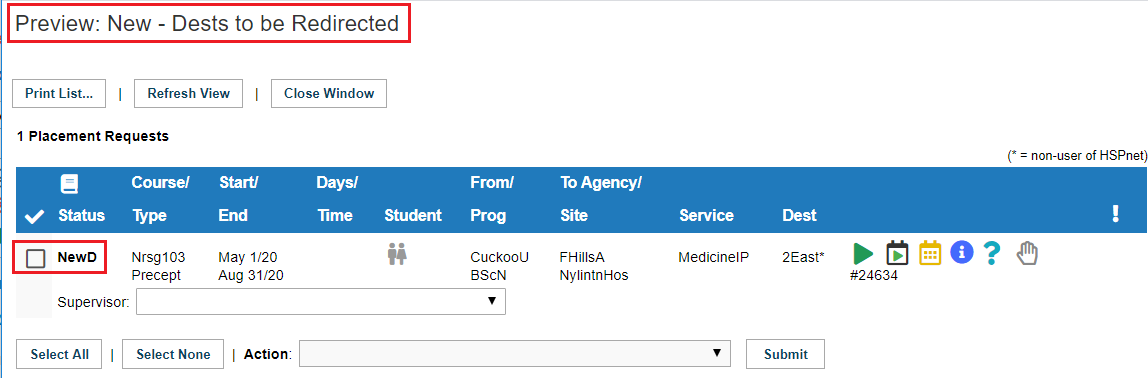
- Click the Advanced Schedule Icon
 beside an eligible placement request.
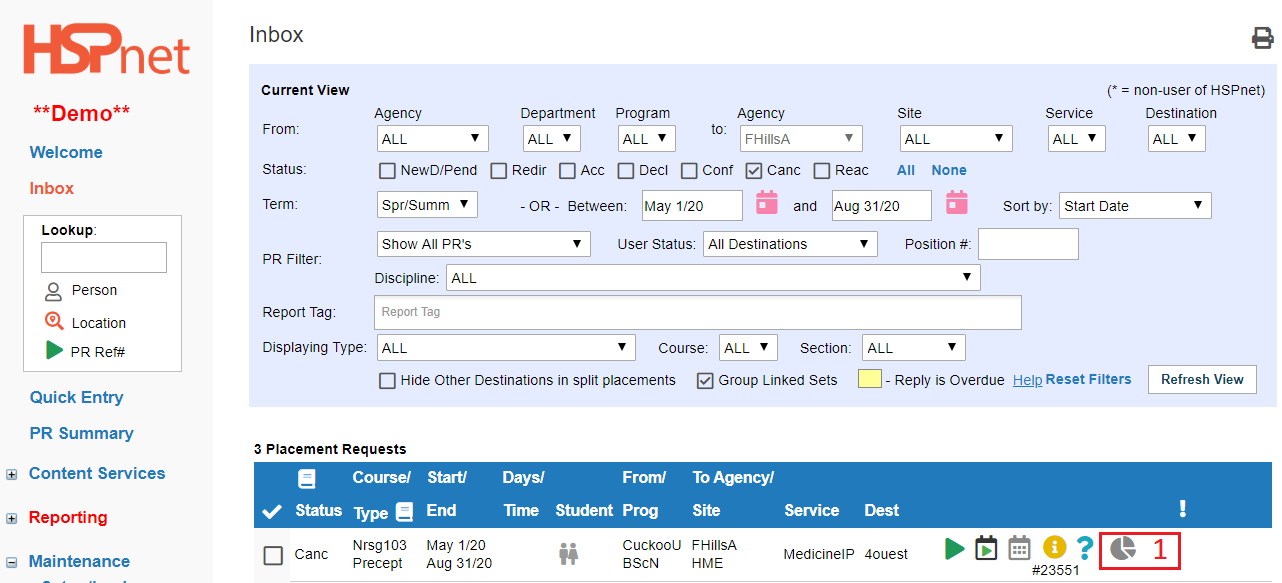

2. Click the add icon 
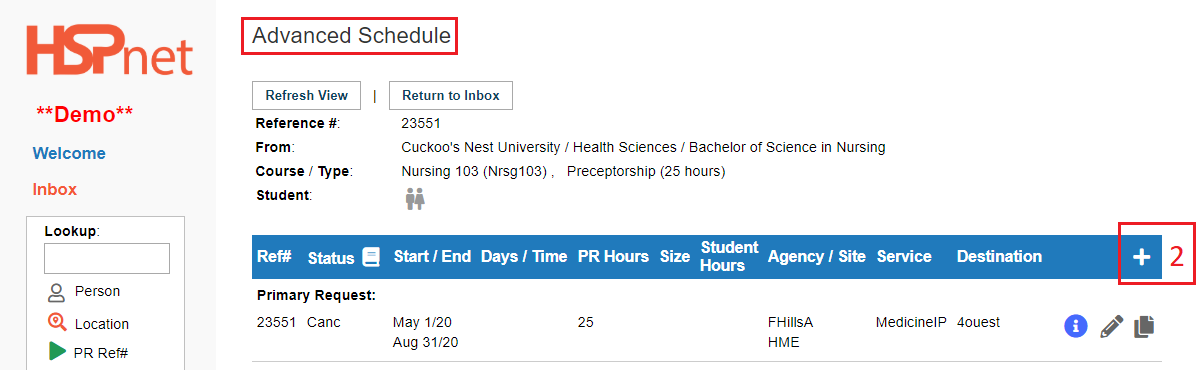

-
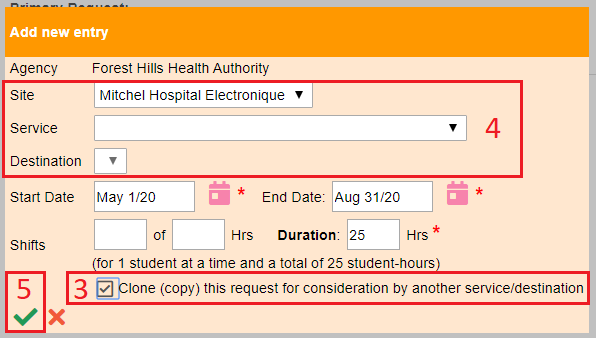
Click to place a check mark in the box in front of "Clone (copy) this request for consideration by another service/destination." If this box does not show up, the placement is not eligible for cloning.
-
Select the site, service and destination where you plan to redirect the request.
-
5. Save the changes with the green check mark.


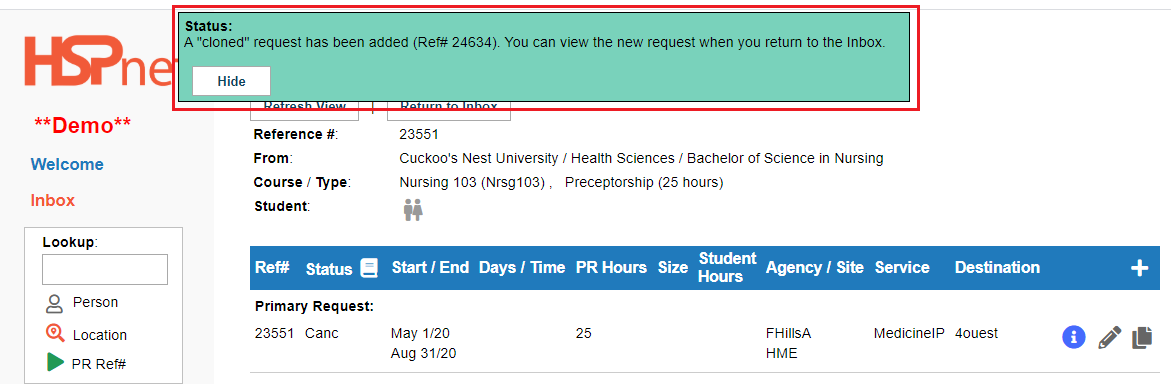
A green background message will display*: A "cloned" request has been added (reference number).* You can view the new request when you return to the inbox.



<div class="greybox" align="left">

[worddave9f330a35d8bf71f1be4b27549c2b685.png](attachments/20807688/20807687.png) (image/png)

[worddavdf4e65f0f63c4a6bb844bde719e09181.png](attachments/20807688/20807689.png) (image/png)

[worddav8a5b8c990c8efc5489c4c9da98ac884b.png](attachments/20807688/20807690.png) (image/png)

[worddav8dfc0465d1798eda9bf178d7a81ceb01.png](attachments/20807688/20807691.png) (image/png)

[worddav0e1851ce23a4040d631d942159eb6841.png](attachments/20807688/20807692.png) (image/png)

[worddav90f29d42a6260cf7cc5e40c60e75b95f.png](attachments/20807688/20807693.png) (image/png)

[worddav665dc215afde8ec2abcd97876baf8d61.png](attachments/20807688/20807694.png) (image/png)

[worddav6f532f8683208d0c644d64acf9b15d80.png](attachments/20807688/20807695.png) (image/png)

[image2020-6-8_11-4-20.png](attachments/20807688/33359166.png) (image/png)

[image2020-6-8_11-6-59.png](attachments/20807688/33359169.png) (image/png)

[image2020-6-8_11-16-42.png](attachments/20807688/33359173.png) (image/png)

[image2020-6-8_11-20-6.png](attachments/20807688/33359175.png) (image/png)

[image2020-6-8_11-22-41.png](attachments/20807688/33359177.png) (image/png)

[image2020-6-8_11-24-8.png](attachments/20807688/33359179.png) (image/png)
</div>
</div>
</div> </div>
<div id="footer" role="contentinfo">
<section class="footer-body">
Document generated by Confluence on Nov 03, 2023 14:35
<div id="footer-logo">[Atlassian](https://www.atlassian.com/)</div>
</section>
</div>
</div>