
Staff/Users - Staff Record - Staff File Uploads of 15 or more records/other conditions
Placing & Receiving Agency Related Guide (PARG RARG)
Summary:**
Background
All internet transactions via HSPnet are secured with industry standard encryption, and this provides a secure option for uploading staff data files via HSPnet. This feature allows a Local Administrator to submit lists of Instructors or Supervisors (preceptors) for upload to the Staff database.
Supported Uses
Update of staff data via upload of a data file is appropriate for adding or updating multiple records (15 or more) in the following situations:-
- Upload of prerequisite data to instructor profiles (Eg: First Aid Certificate, CPR) can be accommodated as a customized data upload only.
Upload File Specifications
You may need to contact your Information Systems (IS) department for instructions on generating an extract file from your staff information system. In some cases your IS department will need to generate the extract if your system does not allow you to do this on your own.1.
O****Only one upload file can be accommodated per Department or Program at a time when uploading via the link on the Staff Maintenance screen.
2. Correction of errors – the following corrections must be made before uploading a data file to HSPnet or the upload file will be declined:-
3. Mandatory fields to be included (each in a separate column):-
4. Some examples of additional fields that may be included (each in a separate column):-
File Upload Instructions1.
The Upload Staff File window requires you to specify the Department (e.g. Nursing) and Staff Role (e.g. Instructor) for each upload.

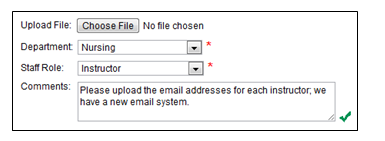
3. Each successful upload generates an email to the HSPnet Help Desk, who will then review the file and reply via email when the upload is complete, if there are any questions, or if the request is declined. Instructions for follow-up will be sent in some situtatins,situations, such as if a record could not be uploaded due to duplicate entry or other problem.
Upload files containing 15 or more staff names are appropriate for upload using the feature described above. For uploads of less than 15 staff, it is faster for you to add the new staff records individually via the Staff Maintenance screen.
</div>
<div class="pageSection group">
<div class="pageSectionHeader">
## Attachments:
</div>
<div class="greybox" align="left">

[worddav68ae31fd646ea2c673f0f78beca2b03a.png](attachments/10781181/10781180.png) (image/png)

[worddav72432d43d68fe363f4e723847d992aba.png](attachments/10781181/10781182.png) (image/png)

[worddavd1005b86bf0c8e35dd2ce9f1a6b82647.png](attachments/10781181/10781183.png) (image/png)

[1.PNG](attachments/10781181/10781184.png) (image/png)

[2.PNG](attachments/10781181/10781186.png) (image/png)
</div>
</div>
</div> </div>
<div id="footer" role="contentinfo">
<section class="footer-body">
Document generated by Confluence on Nov 03, 2023 15:05
<div id="footer-logo">[Atlassian](https://www.atlassian.com/)</div>
</section>
</div>
</div>