Placing Coordinator - Instructor Assigning/unassigning

                        1. 
                                <span>[Knowledge Base](index.html)</span>
                            
                                            
                </div>
                # &#10;                                                <span id="title-text">&#10;                            Knowledge Base : Placing Coordinator - Instructor Assigning/unassigning&#10;                        </span>&#10;                    
            </div>

            <div id="content" class="view">
                <div class="page-metadata">


        Created by <span class="author"> user-b1fcb</span>, last modified by <span class="editor"> Jennifer Rogers</span> on Aug 25, 2022
                    </div>
                <div id="main-content" class="wiki-content group">
                **Placing Agency Related Guide (PARG)****Summary:&nbsp; This shows how to assign or unassign an Instructor via the Outbox and the Assignment Worksheet (scroll down).****To Assign or Reassign an Instructor via the Outbox:**<div class="table-wrap"><table class="wrapped relative-table confluenceTable" style="width: 78.5047%;"><colgroup><col style="width: 58.7325%;"><col style="width: 41.252%;"></colgroup><tbody><tr><td class="confluenceTd"><div class="content-wrapper">

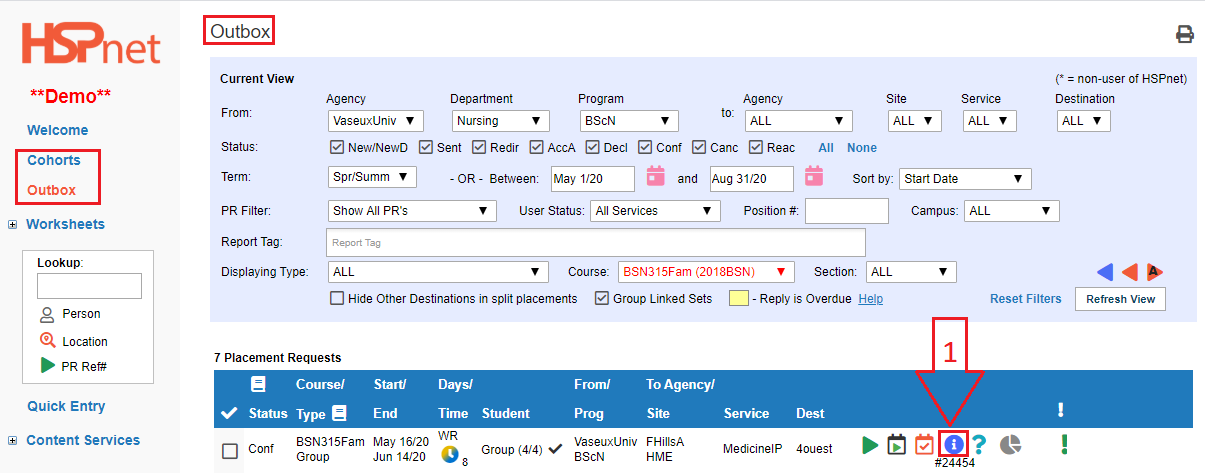
Outbox: In Cohorts go to your Outbox: goto outbox worksheet

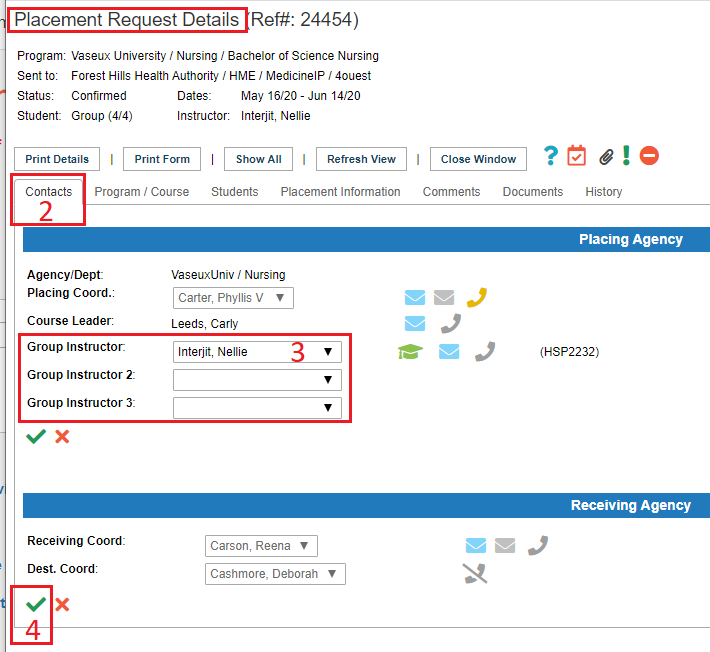
  1. Click the details details (ibubble icon) icon to open the placement request.   


2. Select the contacts tab.

3. Select a different instructor from the drop down list

4. Save the changes with the green check mark.  save

To Assign or Reassign an Instructor from the Individual or Group Assignment Worksheet:

Assignment Worksheet - Instructors can be assigned or re-assigned once requests have been accepted. 
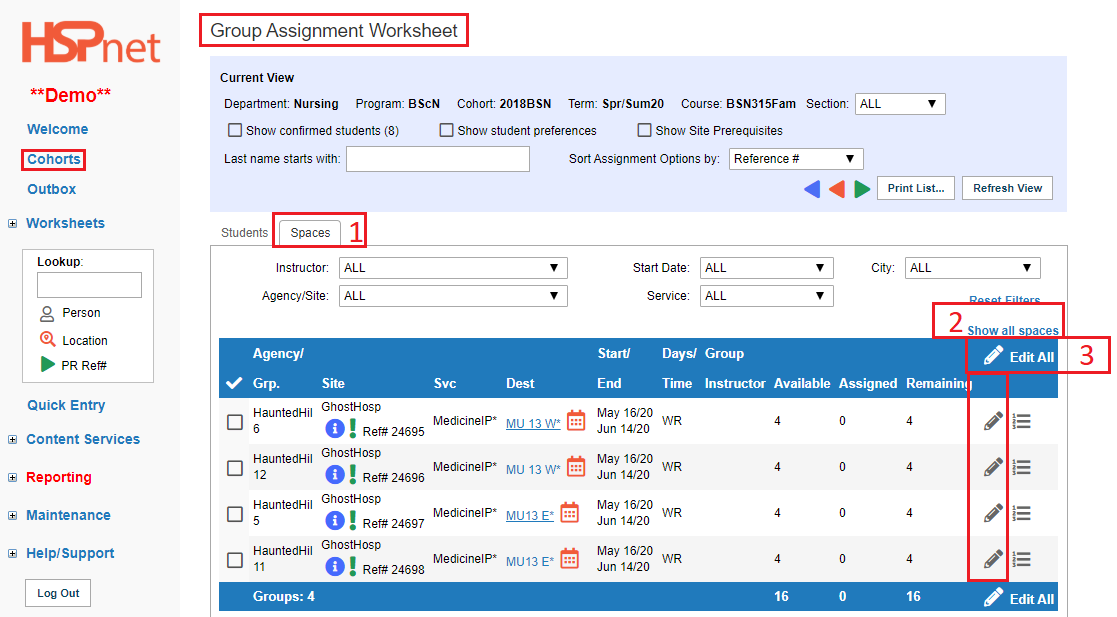
In Cohorts click on the Group goto group assignment worksheet or individual goto individual assignment worksheet Assignment worksheet.

  1. Click the "Spaces" tab
  2. Click: Show all Spaces.
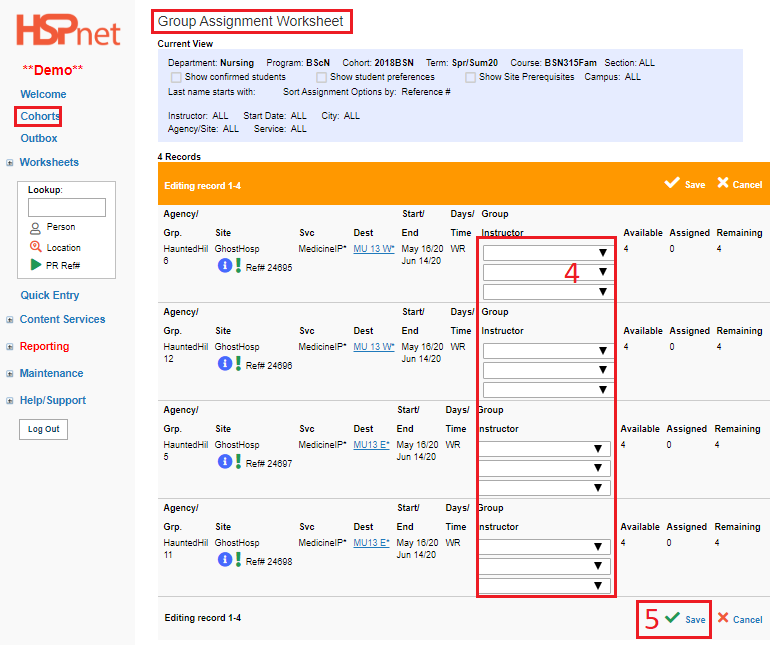
  3. Click: *Edit All,*or the pencil edit icon to edit one placement at a time.

  1. Select instructors from the drop down lists. 

  2. Save the changes. save


## Attachments:
                    <div class="greybox" align="left">
                                                        ![](images/icons/bullet_blue.gif)
                            [worddav2329685427d3f55b9990ebfbb8ae5a8d.png](attachments/11505473/11505472.png) (image/png)
                              

                                                        ![](images/icons/bullet_blue.gif)
                            [worddava06bf1063d019717bd0b157f8206ff53.png](attachments/11505473/11505474.png) (image/png)
                              

                                                        ![](images/icons/bullet_blue.gif)
                            [worddav097468046c45b5cbcf72d0b37ded6969.png](attachments/11505473/11505475.png) (image/png)
                              

                                                        ![](images/icons/bullet_blue.gif)
                            [worddav0e1851ce23a4040d631d942159eb6841.png](attachments/11505473/11505476.png) (image/png)
                              

                                                        ![](images/icons/bullet_blue.gif)
                            [worddava8b854c655185be820f4c66ffe8a1b7a.png](attachments/11505473/11505477.png) (image/png)
                              

                                                        ![](images/icons/bullet_blue.gif)
                            [worddav1f83a7974349a05198dc8e13dced905c.png](attachments/11505473/11505478.png) (image/png)
                              

                                                        ![](images/icons/bullet_blue.gif)
                            [worddave7b81bcd86b055d60c4b39f8a28a57ab.png](attachments/11505473/11505479.png) (image/png)
                              

                                                        ![](images/icons/bullet_blue.gif)
                            [worddav09a184540d7a1d6aab8874b23bb3abc1.png](attachments/11505473/11505480.png) (image/png)
                              

                                                        ![](images/icons/bullet_blue.gif)
                            [worddav568227f476bae26e85ea05b425e65de8.png](attachments/11505473/11505481.png) (image/png)
                              

                                                        ![](images/icons/bullet_blue.gif)
                            [no name.png](attachments/11505473/12648773.png) (image/png)
                              

                                                        ![](images/icons/bullet_blue.gif)
                            [image2020-7-9_11-17-27.png](attachments/11505473/33360789.png) (image/png)
                              

                                                        ![](images/icons/bullet_blue.gif)
                            [image2020-7-9_11-18-37.png](attachments/11505473/33360792.png) (image/png)
                              

                                                        ![](images/icons/bullet_blue.gif)
                            [image2020-7-9_11-23-9.png](attachments/11505473/33360796.png) (image/png)
                              

                                                        ![](images/icons/bullet_blue.gif)
                            [image2020-7-9_11-28-30.png](attachments/11505473/33360798.png) (image/png)
                              

                                                        ![](images/icons/bullet_blue.gif)
                            [image2020-7-9_11-32-49.png](attachments/11505473/33360801.png) (image/png)
                              

                                                </div>
                </div>
                
             
            </div>             </div> 
        <div id="footer" role="contentinfo">
            <section class="footer-body">
                Document generated by Confluence on Nov 03, 2023 14:36
                <div id="footer-logo">[Atlassian](https://www.atlassian.com/)</div>
            </section>
        </div>
    </div>