Course Profile - Hide Instructor, DC, or Supervisor contact info
Placing & Receiving Agency Related Guide (PARG RARG)PARG)
Summary:
PC or RC:PC: Block student view of Receiving Agency Destination Coordinator and/or Supervisor for a specified time before the placement start date.
|
This option can be turned on by a Placing Coordinator as follows:
|
 |
2. Open the course profile  or  for the course you want to set up: |
 |
|
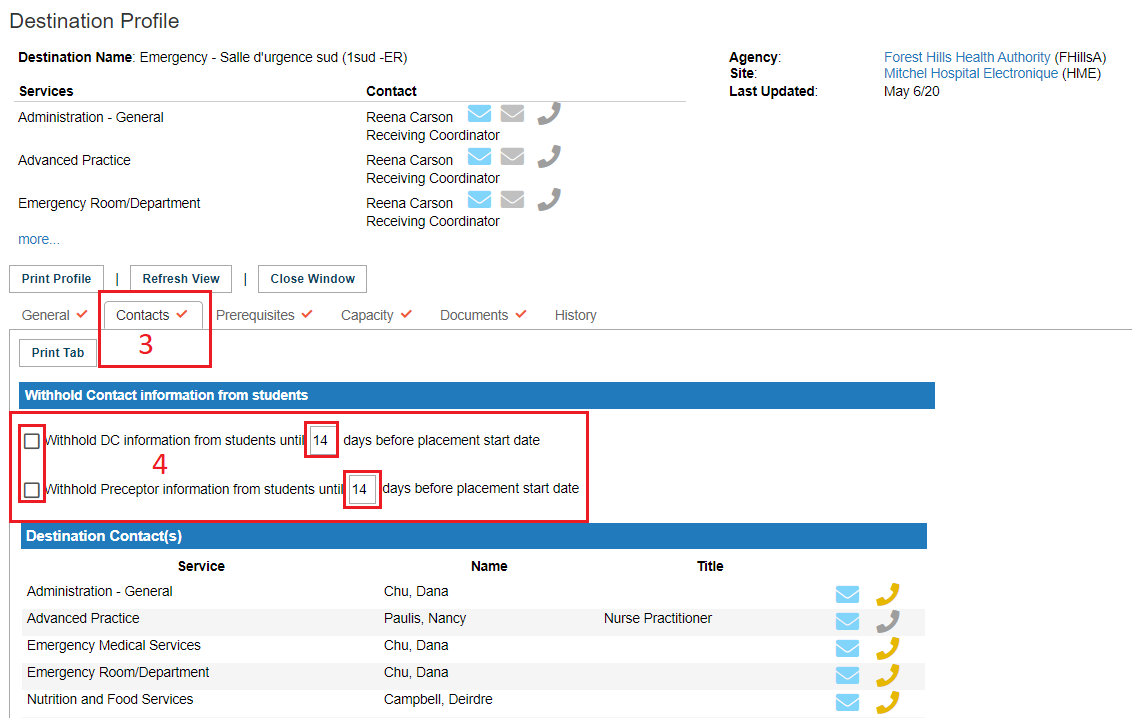
3. Click the Contacts tab. 4. Click to place a check mark in any one or all of the options:
The default is 14 days. If the boxes are not checked, the feature is not turned on and the students with HSPnet access can see the contact information the moment they are finalized and confirmed to the placement request.
For a detailed guide to creating a new course, please click this link. |
|

This Feature can be turned on by a Receiving Coordinator as follows:


3. Select the contacts tab.
4. To activate the feature, click to place a check mark in the box in front of either (or both) DC and Preceptor Withhold features, and set the time period (by default 14 days) prior to placement start. No "save" is required.